Dear HarmonySite administrator,
Lots of useful new features and fixes to announce today...
But first some news: Geordie has received a promotion. A lot of you will know Geordie from his excellent responses to your support questions. Truly he's a marvel. He knows more about websites than I do, and I've been doing this stuff for 30 years (longer than Geordie's been alive)!
Geordie lives in London, England. I live in Australia. I just flew Geordie out to Australia for three weeks, to train him up on aspects of HarmonySite that he was not yet familiar with. He now knows almost as much about HarmonySite as I do, so he'll be answering some support questions for you that only I could do in the past. This will free up some time for me so that I can spend more time developing and improving HarmonySite.
Geordie now knows enough about HarmonySite's architecture to add some useful new features to the HarmonySite system. In fact, the first new feature listed below (email autosave) was done entirely by Geordie...
Email Autosave
We occasionally receive messages from our customers saying something like, "I just spent an hour composing a long email in your "Send Email" page, only to lose it all." I never have a good answer to that. The Send Email page retains the email you type essentially forever until you send it (as long as you don't refresh/reload the page, or navigate to some other page and come back). There's nothing in our code that "times out" and deletes your work. But sometimes browsers can do weird things, or people accidentally move to a different page, and the email they typed can disappear. Hugely frustrating to have to type it all in again, of course.
Geordie has fixed all that. Now, every word of text you type into the body of the email on the "Send Email" page is auto-saved every couple of seconds. You can see that in action here...
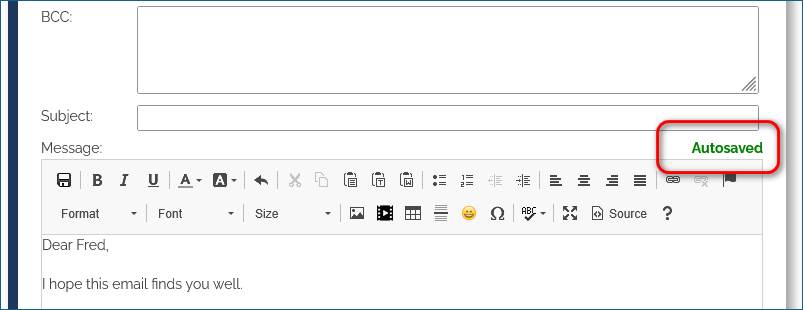
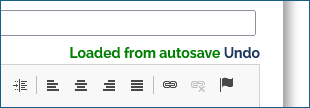
So you can now type something into an email, then either reload the page, go to a different page and come back, or even close your browser and reboot your computer - and when you return, all the text you typed will be automatically restored into the email. You will get a little notification about that, here...
If you didn't want that text to be put back into your email, then simply click "Undo"...
Event Ticket Pricing records can now have a "Maximum" quantity
When creating event ticket pricing records (e.g. "Adult" ticket for "General seating" = $25), it has always been possible to specify the minimum number of tickets that must be purchased in one transaction. Now it's possible to specify a maximum number of tickets in one transaction...
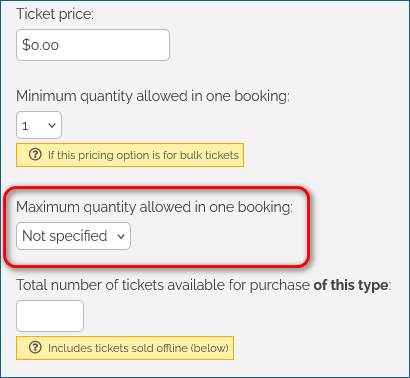
This might be useful if the event was some kind of convention, and each ticket represents one "delegate registration" for that convention. In an event like that, you would perhaps want each ticket/registration to be made separately, by each delegate. If that's the case, you would set the maximum to 1.
There are several other use-cases for this new option.
Canadians can now pay HarmonySite invoices using Interac
Up until now HarmonySite invoices to Canadian customers had to be paid for by either credit card or PayPal. Our bank now supports Interac, so Canadian customers can now use Interac (bank transfers) to pay HarmonySite invoices.
New type of email address for positions: Forwarder to external email address(es)
As you know, each "position" (e.g. President, Music Director, etc) can have its own email address. Such email addresses were usually either a forwarder to the personal email address of the member that held the position, or a proper POP mailbox on the server. Now there's another useful option: A forwarder to any email address (or several email addresses)...
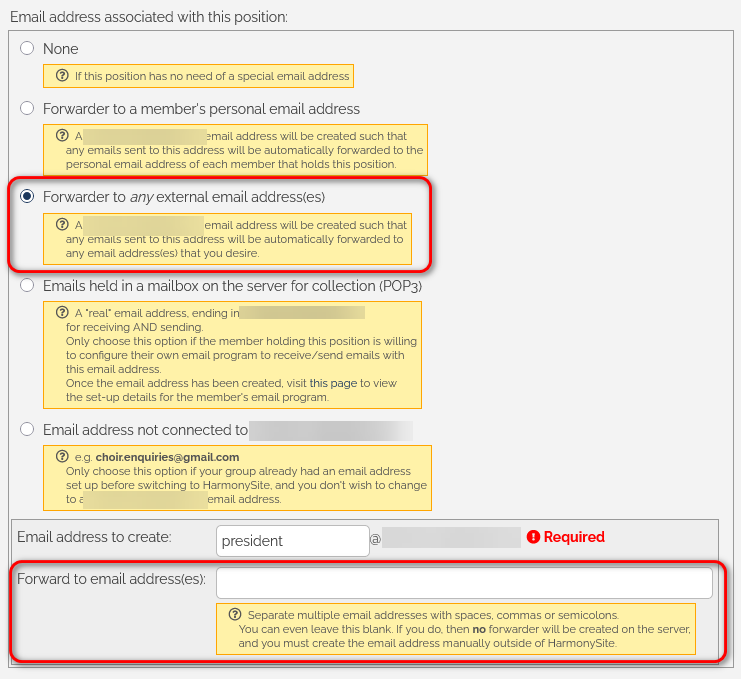
It's fairly self-explanatory. You can now create an email address (e.g. president@mygroup.com) that forwards to any email address you want. You are no longer restricted to forwarding to email addresses from your member database.
In fact, the new email address can forward to multiple email addresses. In the big box circled in red in the screenshot above, you can enter multiple email addresses, separated by spaces, commas or semicolons, and the new email address will forward to all of them.
It's even possible for no automatic forwarding to happen at all. In this situation, the email address you create (e.g. president@mygroup.com) is simply displayed on the "Officers" page against the position. It is up to you to (somehow) create that email address yourself, perhaps in an external email system.
This gives you more options over how your email system works.
Bug fixed: Empty bookings
Starting about two months ago, several of our customers started reporting a new bug in the shopping cart system, where occasionally a booking would get made (and even paid for), but the booking record showed no details about what the booking was actually for (e.g. which event). It was very hard for us to reproduce this bug. Every time we tried, it worked perfectly.
But one of our customers was able to tell us exactly what they did to cause this bug to happen, and so we were then able to fix it.
Improvements to Email Delivery
We've had many reports from our customers recently of legitimate and correctly addressed emails being bounced back to the sender. These are happening more and more often, due to email providers (Gmail, Yahoo, Hotmail, etc) becoming more strict about spam. In such situations, it usually goes something like this...
- fred@gmail.com sends an email to an email address that's a HarmonySite forwarder, such as president@mygroup.com.
- The president@mygroup.com forwarder forwards Fred's email to the personal email address of the holder of that position, such as mary@yahoo.com
- The Yahoo email server looks at the email and sees that it's "from" a Gmail address, but did not come from the Gmail server. It came from the HarmonySite server, by way of the forwarder.
- So the Yahoo email server rejects the email as spam (it didn't come from an authorised Gmail server)
This issue should now be a thing of the past. We've made a clever adjustment to the HarmonySite email server so that the email doesn't appear to Yahoo to be "from" a Gmail address. It now appears to be from a legitimate @mygroup.com email address. So the email doesn't get rejected.
Note that the email still appears, visibly, to be from the original Gmail sender, and replies will still go directly to that Gmail sender. The cleverness is buried underneath the surface.
Using Gmail to store emails from a HarmonySite email address
As you may know, we (HarmonySite) don't allow you to store your old, historical emails on the HarmonySite server. We have limited space on our server, and that space should not be used to store hundreds of thousands of emails dating back 10 years for all our customers. A better place to store them is locally in your email program, or even better - in a Gmail account, which offers Gigabytes of email storage for free.
Gmail provides a hugely useful feature that allowed you to collect emails from any external POP email account, delivering them into the Gmail Inbox (and send replies in Gmail via that same external email account too). Essentially you could use a Gmail account as a single unified email program for multiple email addresses. As I said, hugely useful.
But Gmail has now deprecated that feature. It will be removed in the next couple of months.
Thanks to two of the new HarmonySite features above, we can continue to use Gmail for that purpose. The two features I'm referring to are...
- Create an email forwarder to any external email address, and
- Improvements to email delivery (above)
So if you were Fred Smith, President of "My Group", and you had an Gmail address of mygroup.president@gmail.com, you could set up an email address in your HarmonySite of president@mygroup.com, and have it automatically forward to mygroup.president@gmail.com. Due to our new deliverability improvements, those forwarded emails will be successfully delivered, and probably won't even go into the Gmail spam folder.
As for replying to those emails, you can use Gmail's "send mail as" feature. In the example above, you would configure the Gmail account to "send mail as" president@mygroup.com. (If you don't know how to set up Gmail's "send mail as" feature, ask Mister Google or Professor ChatGPT.)
That's it for now. If you have any questions, please address them to support@harmonysite.com
In harmony,
Mark Virtue
HarmonySite
Australia
+61 2 8005 4277 (Australian number)
In North America, call: 1-415-651-7009 (San Francisco number)