Dear HarmonySite administrator,
Three new features today, to enhance your HarmonySite's shopping cart capabilities...
- Allow an optional donation during checkout
- Allow optional merchandise to be purchased during checkout
- Allow the "check" and "cash" payment methods to be renamed and used for other purposes, such as Zelle, Venmo, etc
These have been requested MANY times!
Here are the details...
Donations during checkout
Now, when someone is making a payment on your website for any of the following...
- Membership invoice
- Event ticket purchase
- Merchandise purchase
- Singing Valentines booking
...the payment page can, if you choose, invite the purchaser to also make an optional donation, on top of what they're already purchasing.
If your HarmonySite is not already set up to take donations, then please first follow the instructions in this help guide for setting them up: https://harmonysite.freshdesk.com/support/solutions/articles/43000225249-accepting-donations
If donations are configured, then note that your HarmonySite may have more than one donation "target" (fund that people can donate to). In the screenshot below, the HarmonySite has TWO donation targets: "Support our choir" and "Convention Travel Kickstarter fund". You can choose which type(s) of donations to accept for each of the 4 transaction types above.
Here's how...
- Logged in with Webmaster Access, click the little "cog" icon in the top-right corner of your site
- Click the cog icon next to "HarmonySite"
- Click the "Payments" tab, and scroll down until you see this...
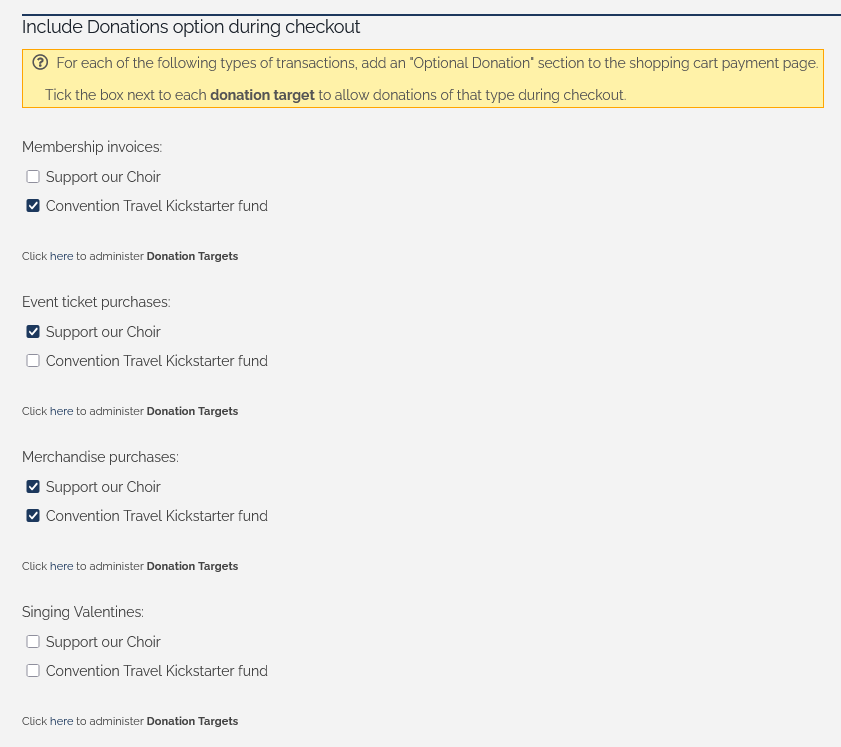
- For each of the 4 transaction types, tick the box next to the donation target(s) you'd like to see presented on their Payment page.
- Click "Save" at the bottom when you're done.
The donation option(s) you selected will appear on the page where they choose their payment method (the final page of the shopping cart process).
Merchandise during checkout
This is a similar option, allowing people to optionally purchase any of your merchandise items during a purchase of...
- Event tickets
- Singing Valentines packages
So now, for example, if you have always wanted to offer purchasers the option of adding a dozen red roses to their Singing Valentines package, or a box of chocolates with their event ticket purchase, you can do that without having to create a separate Singing Valentines package that contains roses, or event ticket type that includes chocolates.
If your HarmonySite is not already set up to sell merchandise, then please first follow the instructions in this help guide for setting it up: https://harmonysite.freshdesk.com/support/solutions/articles/43000224997-selling-your-merchandise-via-your-shopping-cart
The merchandise options offered during checkout are based on the merchandise CATEGORIES. In other words, you select which categories of merchandise you wish to offer during each type of purchase. For example, you might create a new merchandise category called "Ticket extras", which contains boxes of chocolate, bottles of wine, etc - and make that one category available for purchase during the purchase of event tickets.
Setting this up is virtually the same as above...
- Logged in with Webmaster Access, click the little "cog" icon in the top-right corner of your site
- Click the cog icon next to "HarmonySite"
- Click the "Payments" tab, and scroll down until you see this...
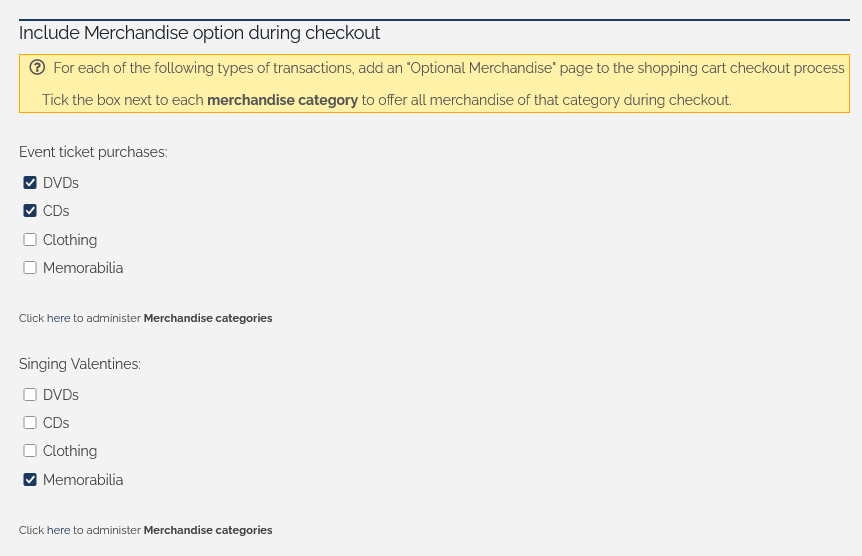
- For each of the 2 transaction types, tick the box next to each merchandise category that you'd like to offer
- Click "Save" at the bottom when you're done.
If you select any, then a new page will appear in the checkout process, immediately after they click "Add to cart", containing the merchandise choices.
You can now rename two payment methods
You can now rename the payment methods "check / money order" and "cash" to be whatever you want, if you're not using them.
For example...
- If you're not using it, the "Check / money order" payment method can be renamed to "Zelle", or similar
- If you're not using it, the "Cash" can be renamed to "Venmo", or similar
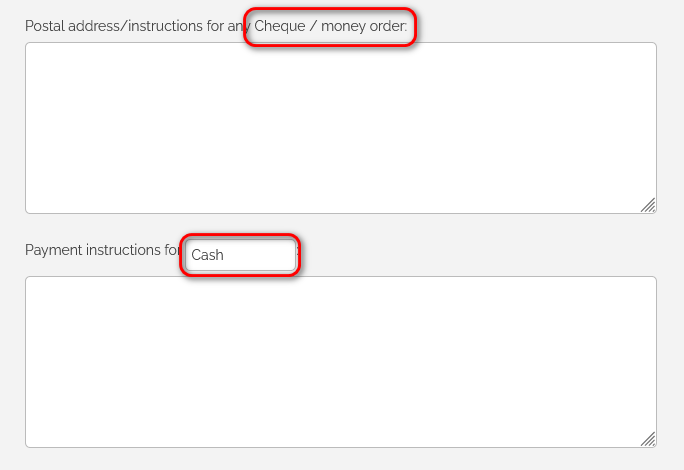
Then the boxes immediately under those names can be adjusted to that they can contain instructions, links, images, QR codes, etc. (The boxes right now can only contain plain text).
Unfortunately, this is NOT something you can change yourself. If you would like these changed, please email support@harmonysite.com, and we'll take care of it for you. Please be sure to include in your email which payment option you’d like renamed, and what the new name should be.
Also note that any payment options that you specify here are NOT integrated with the HarmonySite software, and so if someone makes a payment using one of those methods, their order/booking/etc will NOT be marked as paid automatically. When you confirm payment of their purchase, you will need to mark the order/booking/etc as paid MANUALLY.
That's it for now. Any questions, please email them to support@harmonysite.com
In harmony,
Mark Virtue
HarmonySite
Australia
+61 2 8005 4277 (Australian number)
In North America, call: 1-415-651-7009 (San Francisco number)